

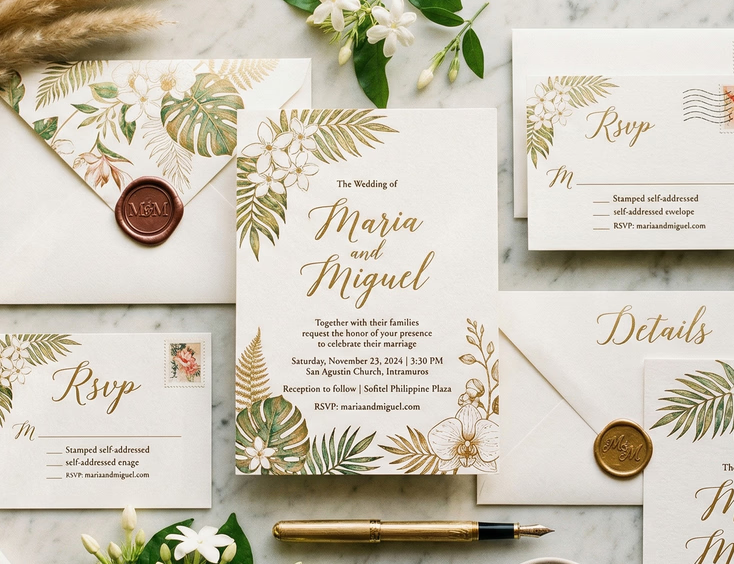
How to Send Wedding Invitations via Viber, Facebook, and Email Without Losing the Personal Touch

Sending a wedding invitation digitally is not the problem. Sending it badly is. A beautifully designed digital invitation that arrives in a group chat alongside 47 other recipients, with no personal message attached, communicates exactly the opposite of what a wedding invitation is supposed to communicate. The format is not what makes a digital invitation feel impersonal. The delivery method is.
Filipino couples who send digital invitations well do the same thing couples sending physical invitations do: they treat each guest as an individual. The platform is just the envelope.
Before You Send Anything
Two decisions made before sending determine whether your digital invitations land well or land badly.
Finalize your guest list completely. Sending invitations in batches across two or three weeks creates an impression that guests added later are afterthoughts. Decide who receives an invitation before you send the first one, confirm that list with both sets of parents, and send within a compressed window so no guest discovers through a mutual friend that invitations have already gone out.
Decide which guests receive digital and which receive physical. Not every guest on a Filipino wedding list suits a digital invitation. Principal sponsors, older relatives, and guests in your parents' social networks typically expect a physical card. Sending digital to the guests it suits and physical to the guests it does not is the decision that prevents social friction before it starts. Digital wedding invitations in the Philippines covers exactly which guests fall into which category if you are still working through that decision.
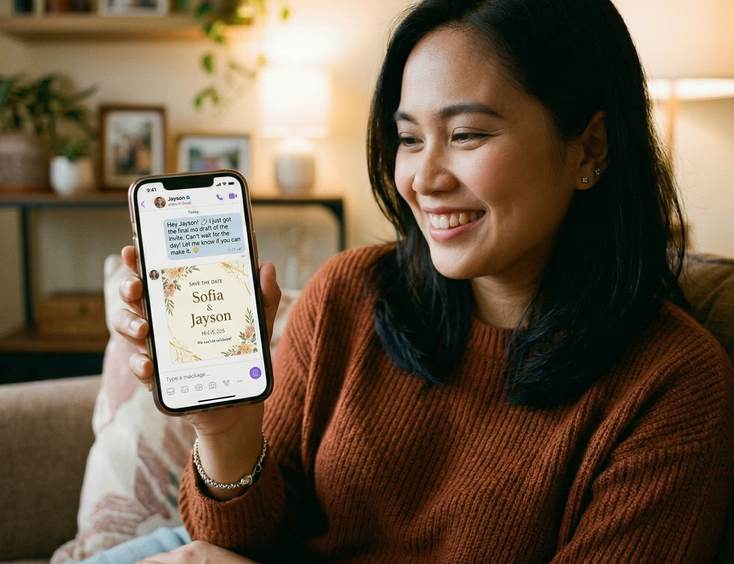
Sending via Viber
Viber is the most common digital invitation platform among Filipino couples, for the simple reason that it is the most widely used messaging app across generations in the Philippines. Older relatives who do not use Instagram or check email regularly often use Viber. This makes it the strongest option for digital invitations going to guests outside the couple's immediate peer group.
Send to individuals, not groups. A Viber group message to all your guests simultaneously is a broadcast, not an invitation. Each guest should receive your invitation as a direct message in their individual chat with you. Yes, this takes longer. That time is the point. The effort of individual sending is what separates a personal invitation from a mass notification.
Write a message before the invitation file. Do not lead with the invitation image and follow with a generic note. Write the personal message first, then send the invitation as the next message. Something direct and warm that uses the guest's name and says something specific to your relationship with them. A message that could have been sent to any of your 200 guests is not a personal message.
Send from the couple's shared Viber account or from each partner's individual account. Invitations sent from a third party, a parent, a sibling, or a wedding coordinator, lose the personal quality that makes individual delivery meaningful. If one partner handles invitations for their side of the family and the other handles theirs, that division is natural. Outsourcing the sending entirely removes the couple from the act of inviting.
Follow file size guidelines. Viber compresses image files above approximately 10MB. Export your invitation at a resolution that delivers clean visual quality without triggering Viber's automatic compression. A 2000 x 2800 pixel JPG at 72dpi typically sits within the threshold for most invitation designs. Test by sending to yourself before sending to guests.
Check delivery and read receipts. Viber shows message delivery and read status. Guests who have not opened your invitation after a week may not have seen it due to notification settings or an inactive Viber account. A follow-up for unread invitations is reasonable and does not require explanation.
Sending via Facebook Messenger
Messenger suits the couple's peer group and any guest who communicates primarily through Facebook rather than Viber. The same individual-sending rule applies. A Messenger group blast is not an invitation.
Use Messenger for guests, not Facebook posts. Posting your invitation to your Facebook timeline or story announces the wedding publicly but does not invite anyone specifically. A Facebook post is a social announcement. A Messenger direct message is an invitation. These are different acts and guests read them differently.
Send the invitation as an image file, not a link. Messenger renders image files directly in the chat as a viewable graphic. A link to a Google Drive file or an external design platform requires the guest to click through, which adds friction and often goes ignored. Send the invitation file itself, not a link to it.
Personalize the accompanying message. The same principle from Viber applies. Write the guest's name, say something that reflects your actual relationship with them, and make clear this is a personal invitation rather than a forwarded file. Two sentences that are specific to the guest read better than a paragraph of generic warmth.
Be aware of Messenger's file compression. Messenger compresses image files more aggressively than Viber. For invitations with fine detail, small typography, or intricate design elements, PDF sends with better fidelity than JPG in Messenger. Test both formats on your own device before deciding which to use.

Sending via Email
Email suits international guests, corporate contacts, and guests for whom email is their primary communication channel. It also suits any situation where you want to include more information than a messaging app conversation naturally accommodates.
Write a real email, not just a subject line. An email with "Please find your invitation attached" as the body text is not a personal communication. Write a proper email that opens with the guest's name, says something warm and specific, and frames the attached invitation as a genuine expression of wanting them present. The invitation file sits inside a real letter, not the other way around.
Use a clear subject line. "You're Invited: [Couple's Names] Wedding on [Date]" gives guests immediate context before they open the email. A subject line that reads as spam or marketing, or one that is too casual to signal the nature of the message, reduces the chance the email is opened promptly.
Attach the invitation as a PDF. PDF preserves design integrity across email clients and devices better than JPG. A JPG invitation attached to an email sometimes opens in an image viewer at unexpected dimensions. PDF opens as the designer intended it to display. Include both the main invitation and any digital enclosure cards, directions, accommodation notes, RSVP link, as separate clearly labeled attachments or as a single combined PDF.
Send from a personal email address. An invitation arriving from a shared wedding planning Gmail account created the week before sending reads as administrative correspondence. An invitation arriving from a personal email address the guest recognizes reads as coming from someone they know. Use your own address.
Request read receipts selectively. Email read receipts require the recipient's email client to support them, and many do not. For guests whose response you need to confirm, a follow-up after ten days is more reliable than depending on read receipt delivery.
The Personal Message Is Not Optional
Across all three platforms, the personal message accompanying the invitation file is what determines whether the digital invitation feels like an invitation or a notification. Filipino social culture places high value on the relational quality of communication, and a digital invitation stripped of personal address reads as efficient rather than warm.
The message does not need to be long. It needs to be specific. A message that uses the guest's name, references something about your relationship with them, and expresses genuine desire for their presence at the wedding does the job in three sentences. A message that could have been copy-pasted to every guest on your list does not do the job regardless of its length.
If you are sending 80 digital invitations, writing 80 slightly different personal messages takes time. That time is the same time a couple spends hand-addressing physical envelopes. The effort is the medium. It tells the guest how much the invitation means.

Timing Your Digital Sends
Digital invitations follow the same timing logic as physical ones. Sending too early means guests file the information away and forget it. Sending too late means guests have already made conflicting plans.
For local guests, send digital invitations six to eight weeks before the wedding. For international guests, eight to twelve weeks gives enough lead time for travel planning. If you are sending a save-the-date digitally before the formal invitation, send that three to six months out for a wedding requiring significant travel.
The Filipino wedding invitation timeline covers the full sending schedule for both physical and digital invitations, including when to follow up on RSVPs after sending.
Following Up Without Awkwardness
Digital invitations make follow-up easier than physical ones because you can see delivery and read status on messaging platforms. This visibility is useful but also creates its own awkward dynamic when a guest has clearly read the invitation and not responded.
A follow-up message sent ten to fourteen days after the invitation is reasonable and does not require apology. Frame it as a practical question about catering numbers rather than a social pressure about attendance. "We're finalizing our guest numbers for the caterer and wanted to check if you can make it" is a direct, non-pressuring follow-up that most guests respond to without friction.
How to follow up on wedding RSVPs without being awkward about it covers this in more detail, including scripts for different guest relationships and what to do when a follow-up still produces no response.
For couples who have not yet decided on the design of their digital invitation, the best apps and websites to make digital wedding invitations for Filipino couples covers the tools that produce designs worth sending through any of these platforms.
Stationery and invitation suppliers in the Philippines lists designers who work in digital formats and can produce a finished invitation file ready for sending via Viber, Messenger, or email without requiring the couple to build the design themselves.
The full resource for Filipino wedding invitation planning, covering design, wording, format, timing, and etiquette, sits in the complete guide to Filipino wedding invitations.
The platform is just delivery. The invitation is the relationship. Send it like one.
Still Searching for a Right Match?
Find Your Perfect Wedding Supplier Today!
Discover trusted wedding suppliers across the Philippines in our complete directory. Compare services and connect with the ones that fit your dream celebration.
Browse Wedding SuppliersFeatured Posts



The Complete Filipino Couple's Guide to Wedding Rings & Bands in the Philippines: Traditions, Styles, Budgets & Where to Buy
22 mins readWedding Reception Ideas that Honor Tradition and Wow Your Guests
4 mins readFilipino Wedding Dress Guide for Style Traditions and Smart Shopping
6 mins readFilipino Wedding Cost Guide - Realistic Budgets, Percentages, and Price Drivers by Region
9 mins readPhilippines Honeymoon Guide - Best Islands, Resorts, Costs & 7–14 Day Itineraries
9 mins readFilipino Wedding Games - Traditions, Modern Twists, and Crowd-Pleasers for Every Reception
8 mins read