


Tips for Managing RSVPs Online When Your Ninongs and Ninangs Are Not Tech Savvy

Your principal sponsors are some of the most important people at your wedding. They are also, statistically, the most likely to miss your RSVP deadline because the online form confused them, the link did not open on their phone, or they meant to fill it out and forgot.
This is not a criticism of your ninongs and ninangs. It is a planning problem you can solve before it becomes a follow-up problem two weeks before your wedding.
Understand the Real Barrier First
Most older Filipino adults are comfortable with Facebook and Viber. They post, they react, they send voice messages. The barrier is not technology in general. It is unfamiliar technology in an unfamiliar context.
An RSVP form on a wedding website is a different experience from scrolling a feed. It asks them to click a link, land on a page they have never seen, fill out fields, and hit submit without any confirmation that something happened. For someone who is not used to that flow, every step is a point where they can drop off and decide to just tell you in person instead.
Your RSVP system needs to account for that. Build it with your least tech-comfortable sponsor in mind, and the rest of your guest list will have no trouble at all.
Keep the RSVP Form as Short as Possible
Every field you add to your RSVP form is another reason for an unsure guest to abandon it. For your principal sponsors, the form should ask for three things: their name, the number of people in their party, and their meal preference if your caterer requires it.
Save the extra questions for guests you know will breeze through a longer form. If you need dietary information or table preferences from your ninongs and ninangs specifically, collect that in a separate conversation, not through the form.
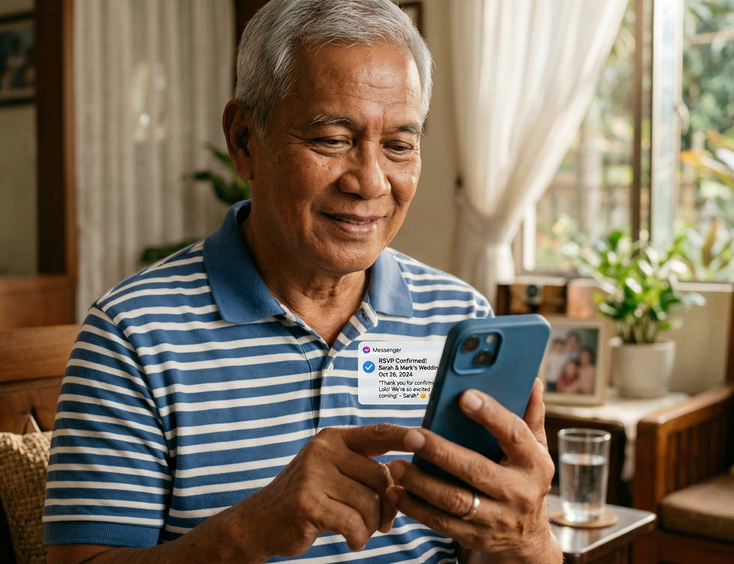
Write the Confirmation Message in Plain Language
After a guest submits your RSVP form, most platforms display a short confirmation message. Do not leave this as the default "Thank you for your response." Write something that tells your sponsor exactly what happened.
A message like "You're all set. We have your RSVP. We will be in touch closer to the wedding with more details." removes any doubt about whether the form went through. Doubt is what sends people back to Viber to ask you if you received it.
Send the Link Directly Through Viber or Messenger
Do not assume your principal sponsors will visit your wedding website on their own. Send the RSVP link directly to each of them through the channel they actually use, which for most Filipino adults over 50 means Viber or Facebook Messenger.
Send the link with a short personal message. "Ninong Boy, here is the link to fill out our RSVP. It only takes a minute and just asks for your name and how many will be joining you." That framing tells them what to expect before they tap the link, which reduces hesitation.
If your principal sponsors are part of a family group chat with your parents, ask your parents to follow up there. A message from a peer carries more weight than a reminder that reads like a system notification.
Assign a Point Person for Tech Support
Pick one person in your planning circle, a younger sibling, a bridesmaid, or your wedding coordinator, and make them the designated helper for RSVP issues. When a ninong calls your mother because the link is not working, your mother calls that person instead of you.
Brief your point person on how the RSVP form works, what the common issues are (link not opening in the default browser, form not submitting on older Android versions, confusion about the meal preference dropdown), and how to escalate to you if something cannot be resolved.
This setup protects your time and your sanity during a period when both are already stretched.

Offer a Phone-In Option for Sponsors Who Will Not Use the Form
Some of your ninongs and ninangs will not fill out the online form. They will intend to, they will lose the link, and eventually someone will RSVP on their behalf at the family reunion. Plan for this.
Include a phone number on your RSVP page with a note that says guests who prefer to confirm by call or text can reach your coordinator at that number. Do not make the phone option the headline. Keep the form as the primary path. But the alternative being available means no sponsor falls through the cracks because the technology did not work for them.
Your wedding website and RSVP setup does not have to be built from scratch. Suppliers who specialize in this handle the form logic, confirmation messages, and guest management so you are not troubleshooting a broken dropdown three weeks before the wedding. Browse wedding website and RSVP suppliers in the Philippines to find vendors who build these systems for Filipino weddings specifically.
Set Your RSVP Deadline Earlier Than You Need It
Your real deadline, the one your caterer or venue needs, should sit at least a week after the deadline you give your guests. For principal sponsors specifically, set an even earlier internal deadline so you have time to follow up personally before the hard cutoff.
Tell your ninongs and ninangs their deadline is two to three weeks before your actual cutoff. Frame it as consideration for them: "We want to make sure everything is arranged well before the wedding." Most will appreciate the heads-up rather than the pressure.
Follow Up in the Right Order
Chase RSVPs in this order: online form stragglers first through a Viber message with the link resent, then a personal call for anyone who has not responded a week before your internal deadline, then a family member relay for anyone who is genuinely unreachable through direct contact.
Do not send a mass reminder blast to your full guest list when the problem is five specific ninongs. A personal message to each of them lands better and does not make your tech-comfortable guests feel like they are being scolded for something they already did.

Record Responses in One Place
Whether your sponsors RSVP through the form, call your coordinator, or tell your mother at church, record every response in one master document. A shared Google Sheet with your partner and coordinator works well. Columns for guest name, RSVP status, number of attendees, and meal preference cover most of what you need.
Reconcile your online form responses against your manual entries every few days. Duplicates happen when a sponsor submits the form and also calls to confirm. Catch those early rather than counting the same guest twice in your headcount.
What to Do Two Weeks Out
Two weeks before your wedding, close the form and lock the list. Anyone who has not responded by then gets a direct call, not another link. At that stage, you need a decision, not another reminder.
For a broader look at how your RSVP system fits into your full wedding website setup, including what pages to build and how to structure your guest information, read the complete guide to creating a wedding website for your Philippine wedding.
If you want to think beyond the wedding day itself, your website can keep working after the reception ends. Read how to turn your wedding website into a memory page after the big day for ideas on keeping your site live in a way your sponsors and guests will actually revisit.
Your principal sponsors showed up for your family long before your wedding. A little extra planning on the RSVP side is the least you can do to make sure they are counted and seated exactly as they should be.
Still Searching for a Right Match?
Find Your Perfect Wedding Supplier Today!
Discover trusted wedding suppliers across the Philippines in our complete directory. Compare services and connect with the ones that fit your dream celebration.
Browse Wedding SuppliersFeatured Posts
Regional Wedding Customs Every Filipino Couple Should Know
23 mins readThe Complete Guide to Filipino Wedding Invitations: From Traditional Customs to Modern Trends
12 mins readThe Complete Filipino Couple's Guide to Wedding Rings & Bands in the Philippines: Traditions, Styles, Budgets & Where to Buy
22 mins read